Crew coordinator

Crew scheduling for your party business, without calling around

Somebody calls around to fill Saturday, texts everybody the night before, and tells each person where to be and what to bring. Then they add up hours, tips, and mileage for payday. Here's how that goes in Rally.

Everything Rally does for this job →
Step 1 · Fill the shift
PROFESSIONAL AND UP

Send the offer, and the crew answer it themselves

You choose who gets the offer, and Rally sends it. If someone says no, your backup list moves on to the next person.
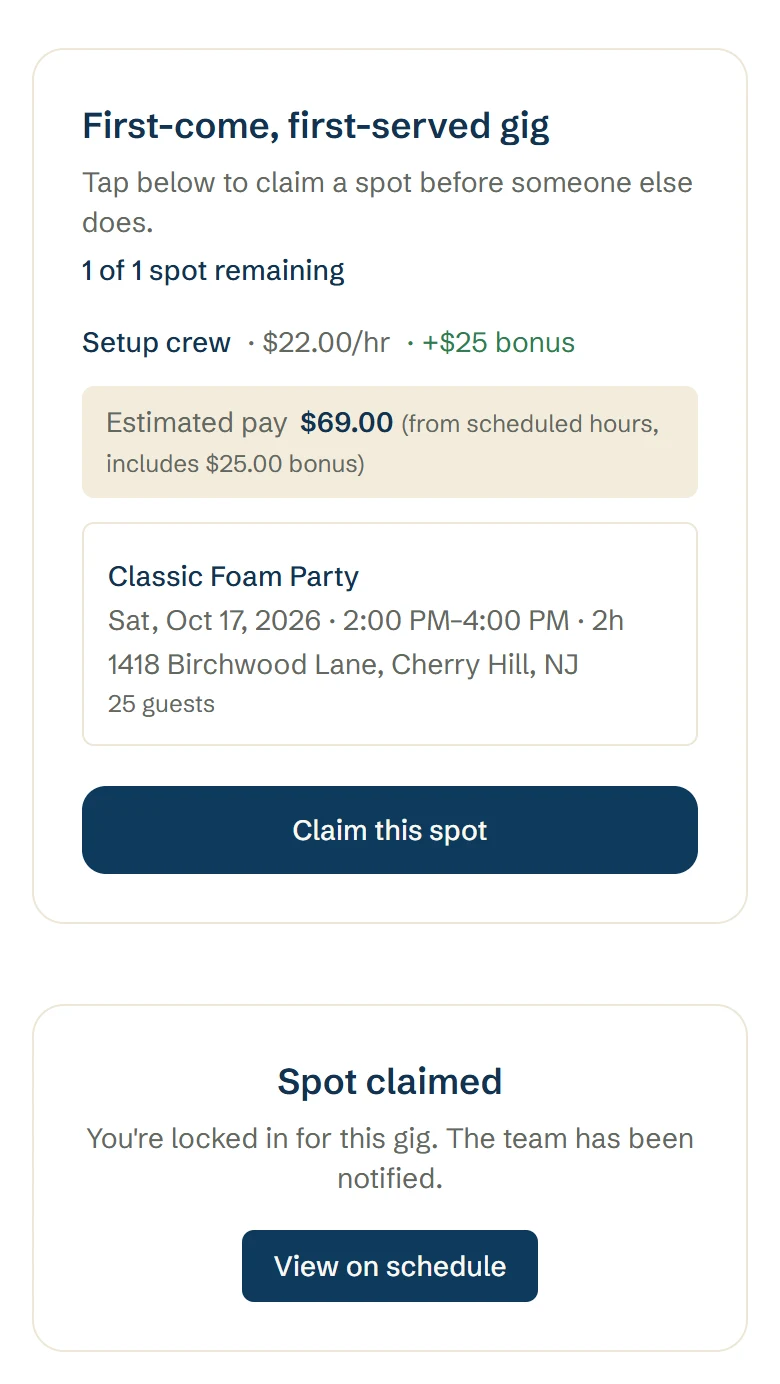
Send one person an offer with an expiry, and they accept or decline
Or send it to several crew as first come, first serve, and whoever claims the spot first gets it
Add a bonus to the offer if you want to
A backup list moves on to the next person if someone declines
Send offers one at a time, or in bulk for an unstaffed day
Rally checks before you put someone on a job that overlaps one they already have
The evening before, Rally asks each crew member to confirm by text or email, and tells you if someone can't make it
A crew member's phone, before and after. First the offer: a first-come, first-served gig with 1 of 1 spot remaining, Setup crew at $22.00 an hour plus a $25 bonus, the Classic Foam Party on Sat, Oct 17, and a Claim this spot button. Then the confirmation: Spot claimed, you're locked in for this gig
Step 2 · Dispatch
PROFESSIONAL AND UP

See the whole day on one board

Dispatch lays the day out by route. You can see who's on each one, which vehicle they're taking, and how long the drive is between stops.
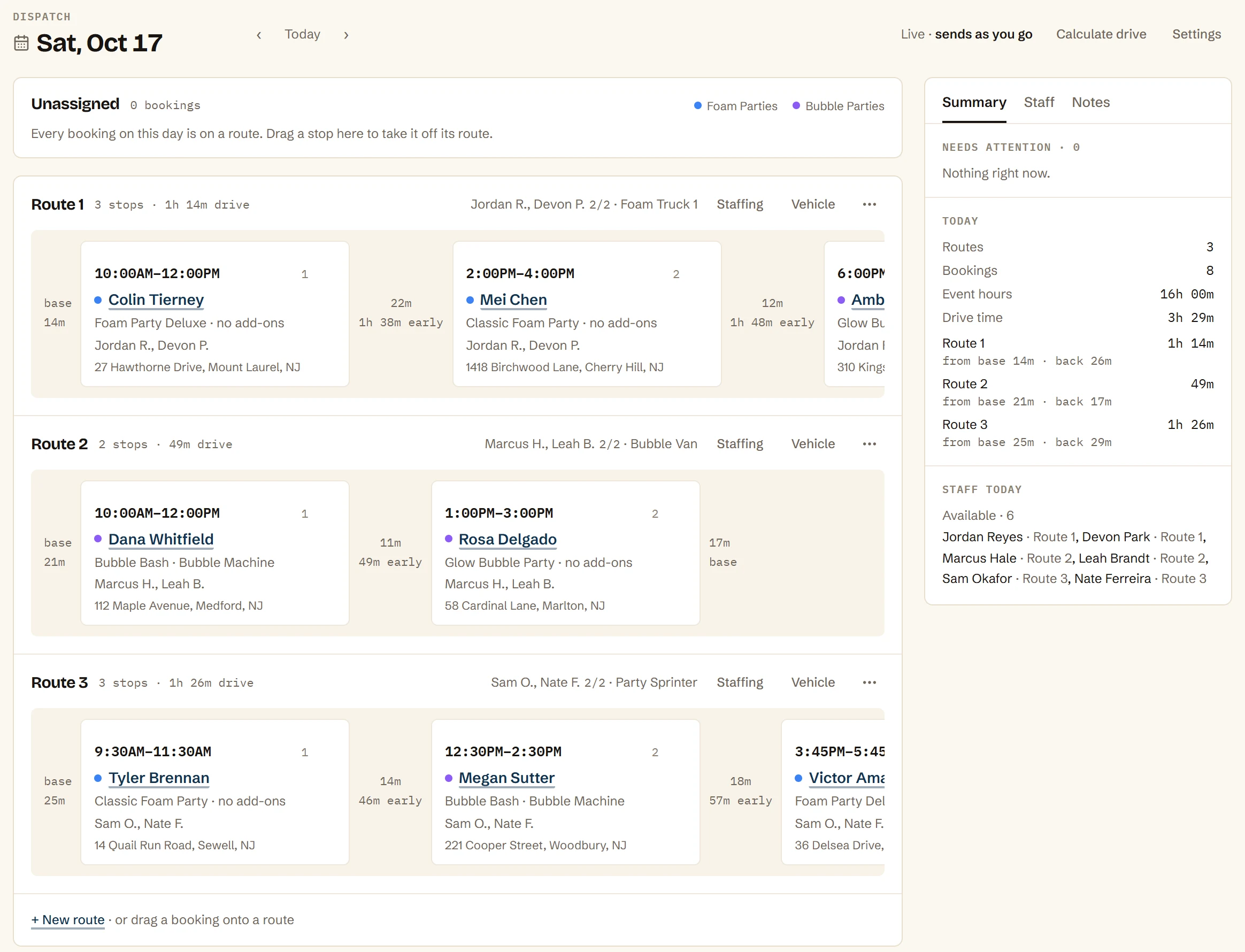
Each route is a row of stops in time order, with its own crew and vehicle
Drive time between every stop and to and from base, calculated from real addresses
Plan my day lines up the day's bookings into routes for you
Drag a booking onto a route, or back to the tray until it's ready
A route flags a stop that will arrive late, a tight gap between parties, or a job that's short on crew, like “Needs 2 crew”
Crew hear by text or email when you assign them, or get an offer to accept
Dispatch for Saturday, Oct 17: three routes, each with its crew and vehicle and two or three bookings in time order, the drive time between every stop and to and from base, and a summary of 3 routes, 8 bookings, event hours and total drive time
Step 3 · Crew portal
PROFESSIONAL AND UP

Each person gets the gig on their phone

Each gig lands in their portal with the times, the address, directions, and what to bring. There's nothing for them to install.
Crew portal on their phone, no app install
Set up, start, end, and pack-up times, and the address with map directions
What to bring, from the equipment you assigned to the booking
Your notes for the crew, the client's contact, and who else is working it
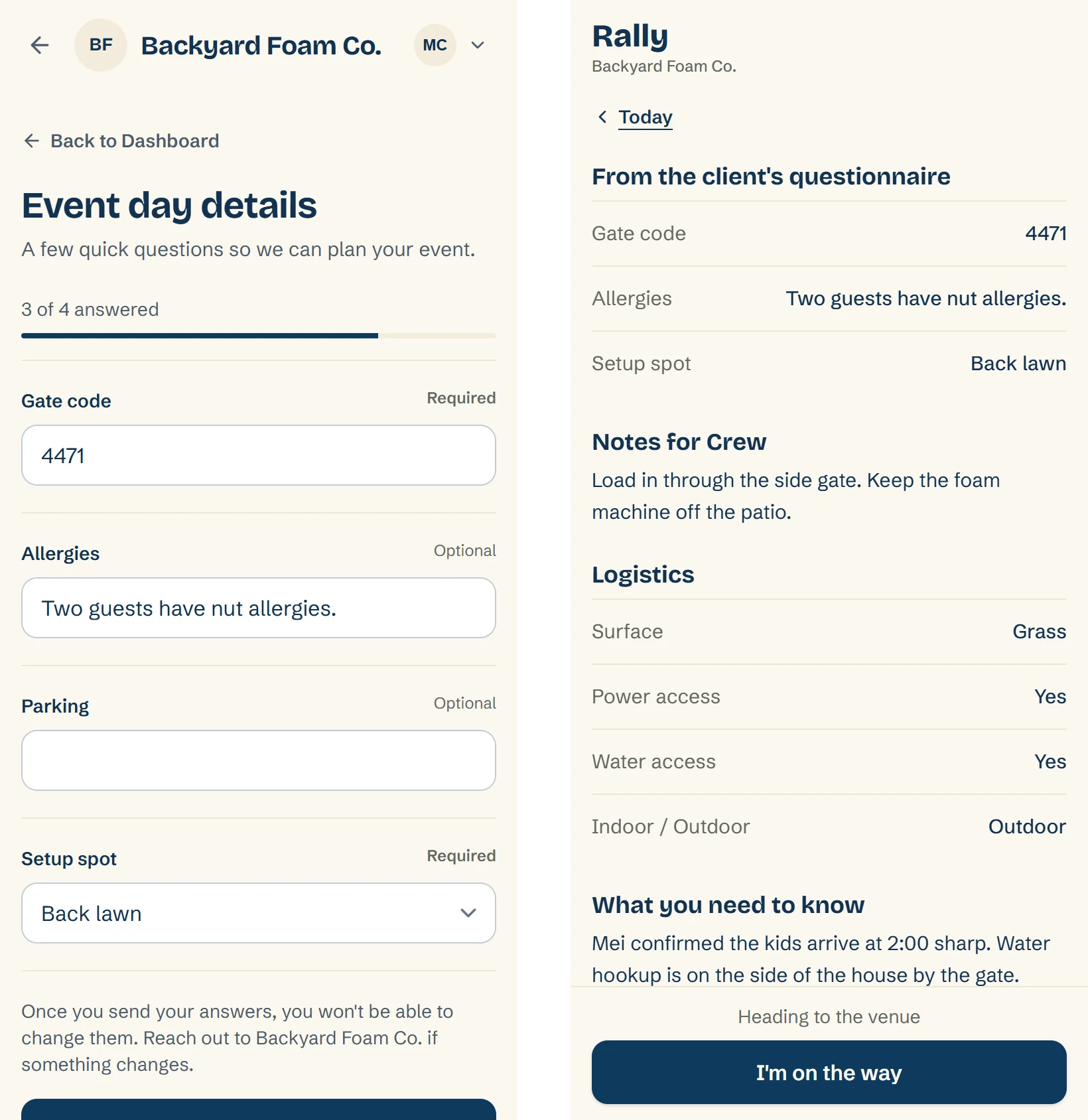
Send each client a questionnaire with your own questions, like the gate code, allergies, parking, and the setup spot
The answers you mark for the crew show on the gig under “From the client's questionnaire”
Status updates they tap as the day moves: I'm on the way, Event Setup, Event Complete
A calendar feed crew can subscribe to in Google, Apple, or Outlook
Two phone screens. On the left, the client's Event day details questionnaire with a gate code, allergies and a setup spot filled in. On the right, the crew's gig page showing the same answers under From the client's questionnaire, with Notes for Crew, Logistics and the I'm on the way button
Step 4 · Crew pay
PROFESSIONAL AND UP

Payday adds itself up

Crew clock in and out on their phone, so pay follows the hours they worked. You still pay them however you do today, and Rally gives you the totals.
Crew clock in and out on the phone, so pay follows actual hours
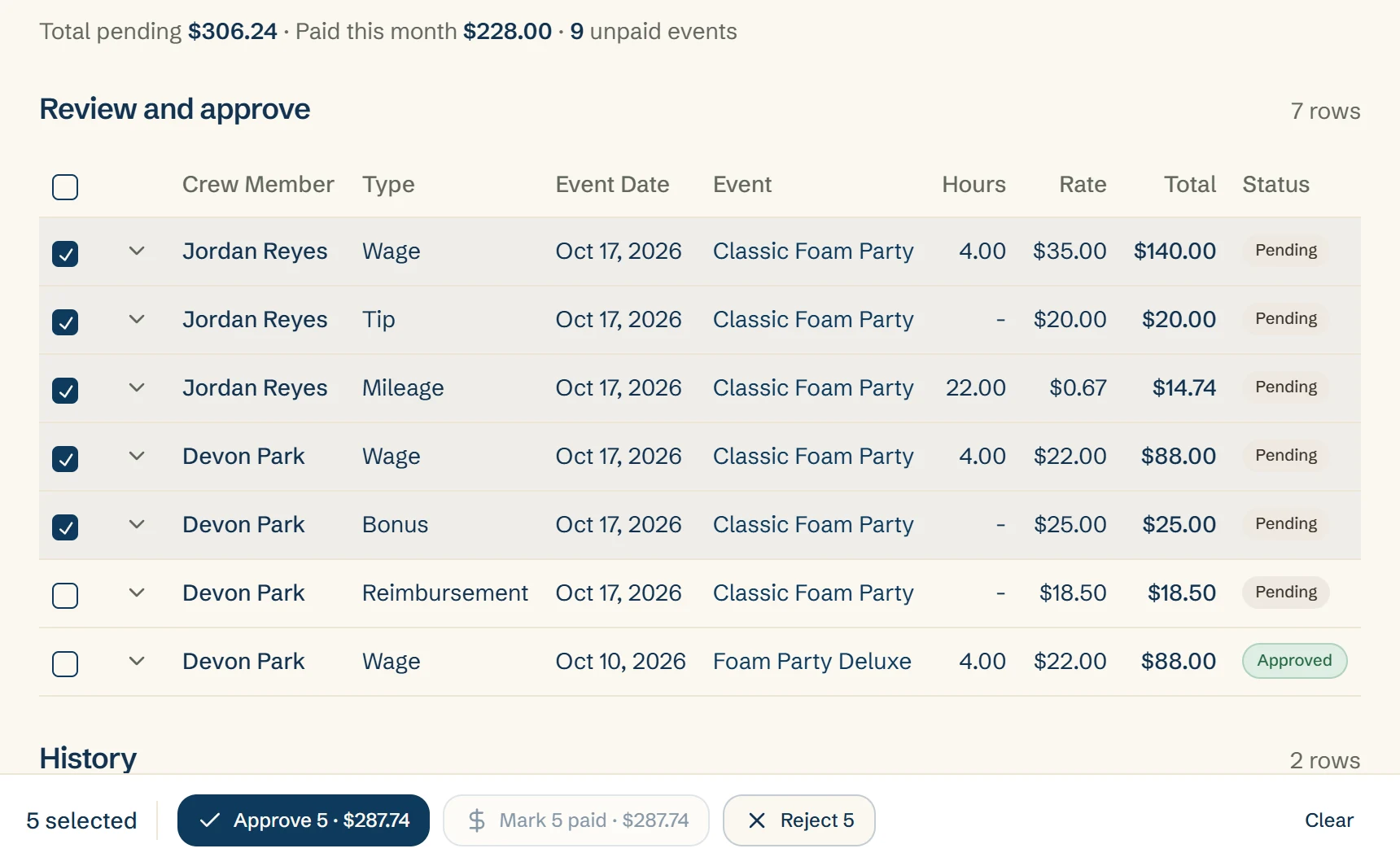
End of day turns tips, mileage, and reimbursements into rows
Bulk-approve the rows when you've looked them over
Mark them paid with a reference once you've paid your crew
Crew see their own earnings, and never what the client paid
The Earnings page, Review and approve: wage, tip, mileage, bonus and reimbursement rows for Jordan Reyes and Devon Park from one Classic Foam Party, five of them ticked, with buttons to approve the five or mark them paid
Questions operators ask
Do my crew need to download an app?

No. The crew portal opens on their phone, and there's nothing to install.

Does Rally choose who works a shift?

You choose who gets the offer. Rally sends it, and if someone declines, your backup list moves on to the next person.

Does Rally pay my crew or run payroll?

No. Rally adds up hours, tips, mileage, and reimbursements so you have the totals, and you pay your crew however you do today. Then you mark each one paid with a reference.

Which plan has crew scheduling?

The crew portal, shift offers, the day-before confirm, crew pay, and Dispatch are on Professional and up. Client questionnaires and calendar feeds are on every plan.

Do I still have to text everyone the night before?

No. The evening before, Rally asks each crew member on the schedule to confirm, by text or email. If someone can't make it, Rally tells you.

Can my crew see what the client paid?

No. Crew see their own earnings. They never see the price of the booking or what the client paid.

What does my crew see about a gig?

The times, the address with directions, the client's contact, who else is working it, what to bring, and your notes for the crew. If you send the client a questionnaire, they also see the answers you marked for the crew.

Can crew add their schedule to their own calendar?

Yes. Crew get a subscribe link that works with Google, Apple, and Outlook calendars. Google can take hours to refresh, so a change may take a while to show there.

What happens if someone declines a shift?

Your backup list moves on to the next person. You can also send the offer to several crew at once as first come, first serve, and whoever claims the spot first gets it.

Stop calling around for Saturday crew

Start free, or book a walkthrough and Danny will map your setup into Rally while you watch.

Your first 10 bookings are free, whenever they happen. No card to start.