Booking agent

Someone has to answer every “how much for 30 kids?”

In most party companies that someone is you. You watch the inbox, approve each request, work out the travel fee and text the client their link. Rally is party rental booking software that does that work from the booking form on your own website.

Everything Rally does for this job →
Step 1 · The request

The request comes in on your own website

The booking form sits on your site and prices the party live as the client picks. The client also ticks off what your gear needs at the venue, so the request reaches you with the questions already answered.
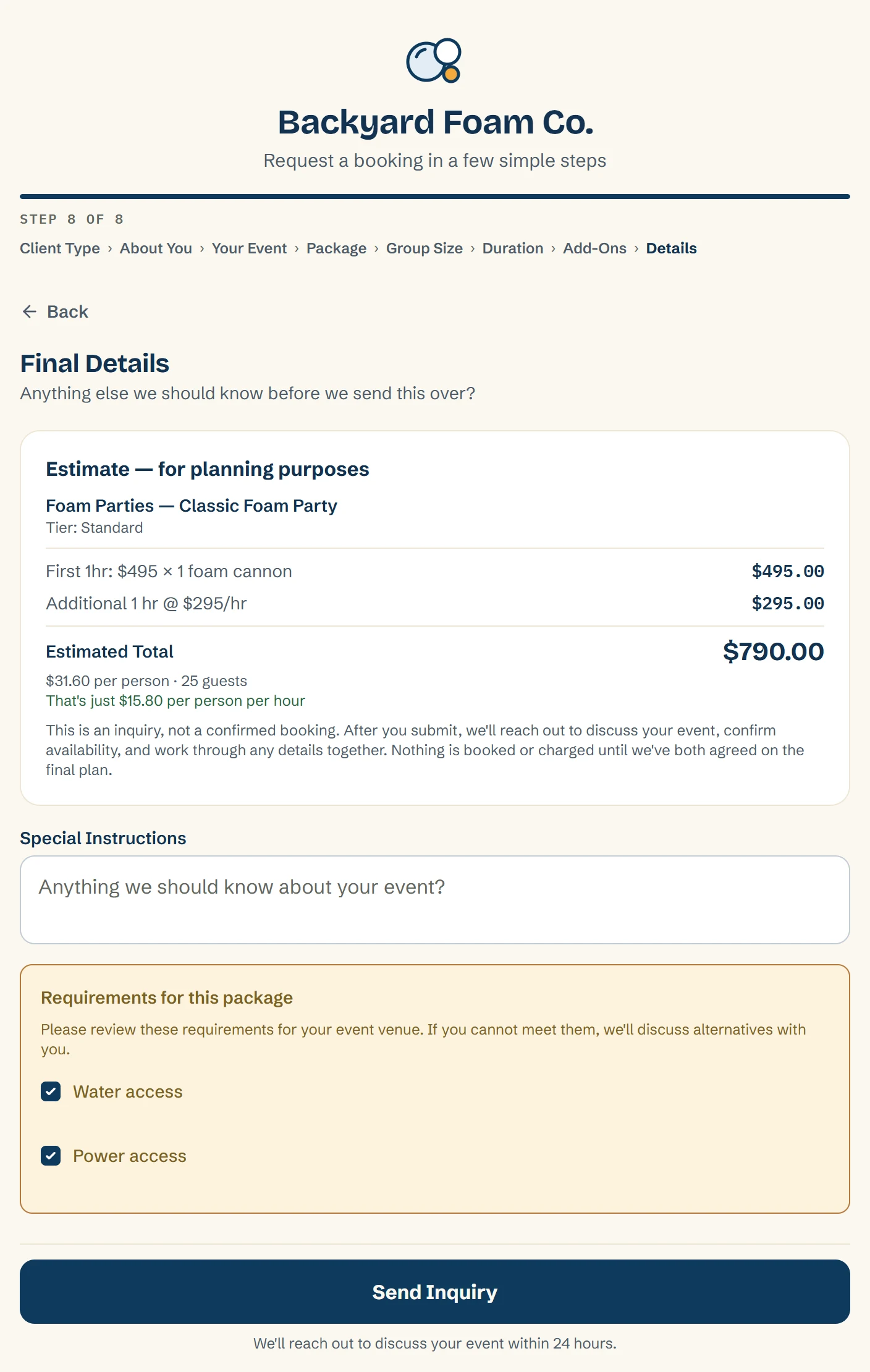
Embedded booking form with live pricing as the client selects package, duration, and add-ons
Add-ons priced flat, per quantity, or per person
Requirement checkoffs the client must confirm at booking, water, power, a dedicated outlet, whatever your gear needs
A warning on any request that's missing one, before anyone loads a van
Setup and teardown time set per service, so the schedule reflects the real footprint of each job
Rally works out the travel fee from Google driving miles, there and back, and shows it to the client as its own line in the price
You set the base, the free radius, the per-mile rate, and the cap for each brand
The last step of the booking form on a client's site: an estimate that adds the Classic Foam Party and its extra hour to $790.00, the venue requirements to tick off, and Send Inquiry
Step 2 · Auto-accept

Normal requests get accepted on their own, and the odd ones wait for you

Auto-accept is a setting. Turn it on and a normal request gets the same treatment as one you approve yourself: the agreement and the deposit request go out without you. If you'd rather review every request yourself, leave it off.
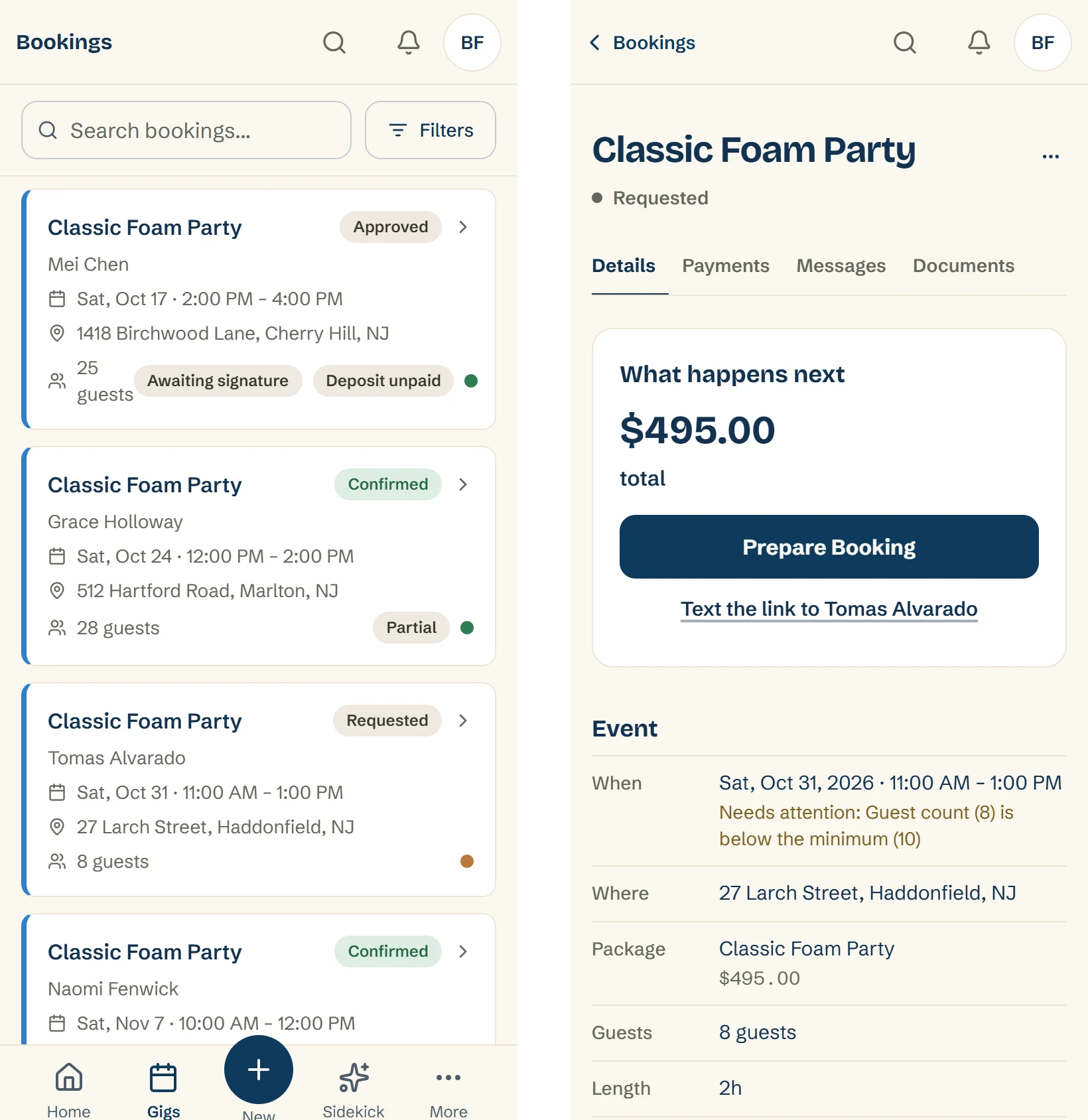
A request that overlaps another booking stays Requested until you've looked at it
A guest count above or below the package's limits waits for you too, and so does a request Rally couldn't price
The same goes for a client type that hides prices, and for an add-on you no longer offer
Open a request that's waiting and the booking says why, like a guest count below your minimum
An accepted request shows as Approved, the same as one you approved yourself
Every inquiry lands in one pipeline, from first request to completed event
An Approved booking still needs the signature and the deposit your rules ask for before it's Confirmed
Two phone screens. On the left, the Bookings list: Mei Chen's Classic Foam Party is Approved and waiting on a signature and the deposit, and Tomas Alvarado's is still Requested. On the right, Tomas's booking with a Prepare Booking button and the line Needs attention: Guest count (8) is below the minimum (10)
Step 3 · Approve and send

Approve, and the paperwork goes out

You used to write back, attach the contract, and ask for the deposit yourself. Now you approve, and the client gets what they need to sign and pay.
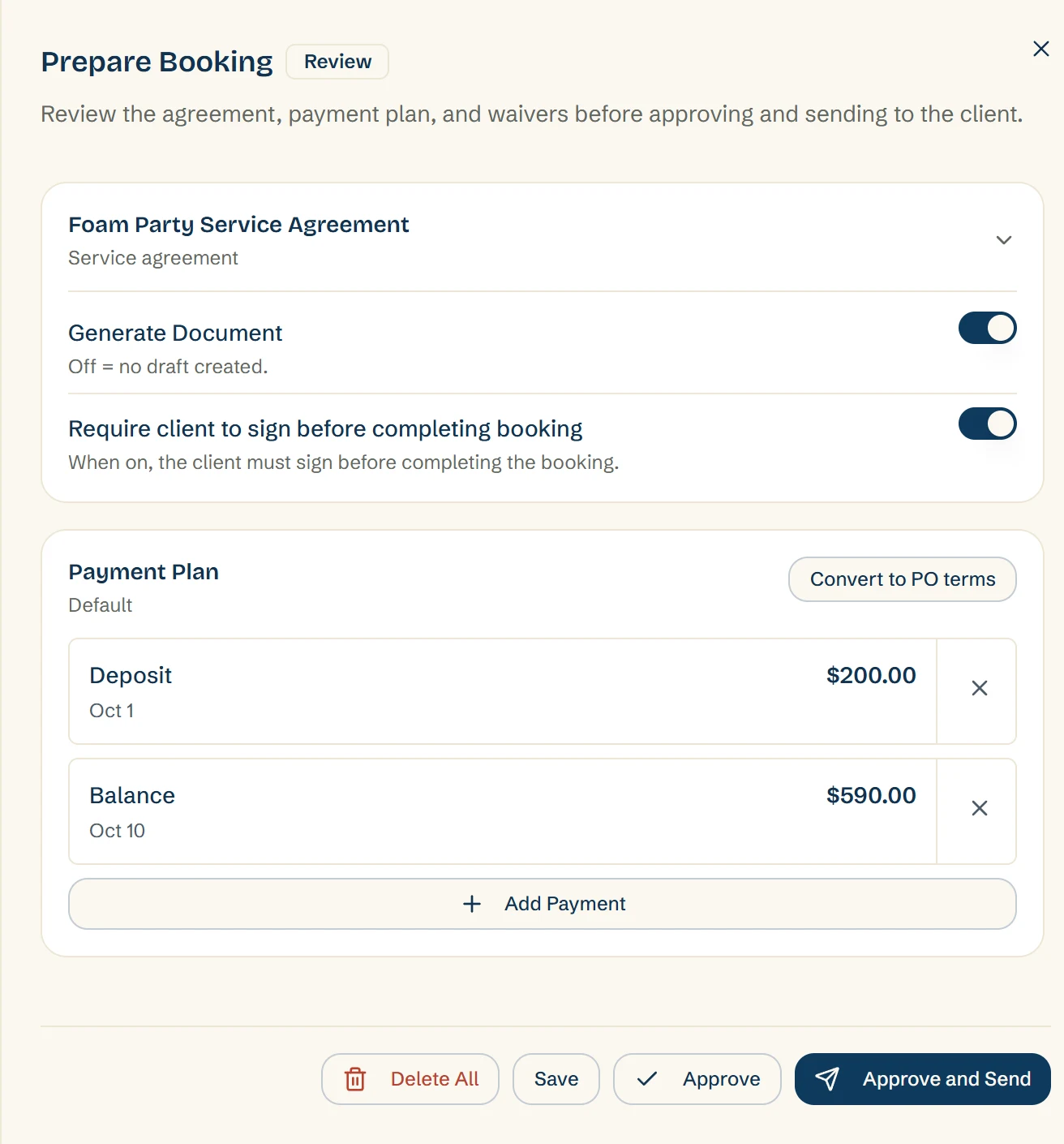
Approve and Send approves the request and sends the agreement and the deposit link together
One button approves and texts the client their link to review, sign, and pay
The text goes from your own connected Quo number. Without one, you send the link from your own phone
If a client replies STOP, Rally stops texting them
Contracts with e-sign built in
Deposit policies you control, including whether an unpaid deposit blocks confirmation
Prepare Booking: the Foam Party Service Agreement set to need the client's signature, and a payment plan with a $200.00 deposit due Oct 1 and a $590.00 balance due Oct 10, ready to approve and send
Step 4 · The client's turn

The client signs and pays without calling you

The link opens the client's portal. They sign, pay the deposit, check the details, or hand it to whoever's actually paying. Every email from Rally links back to it.
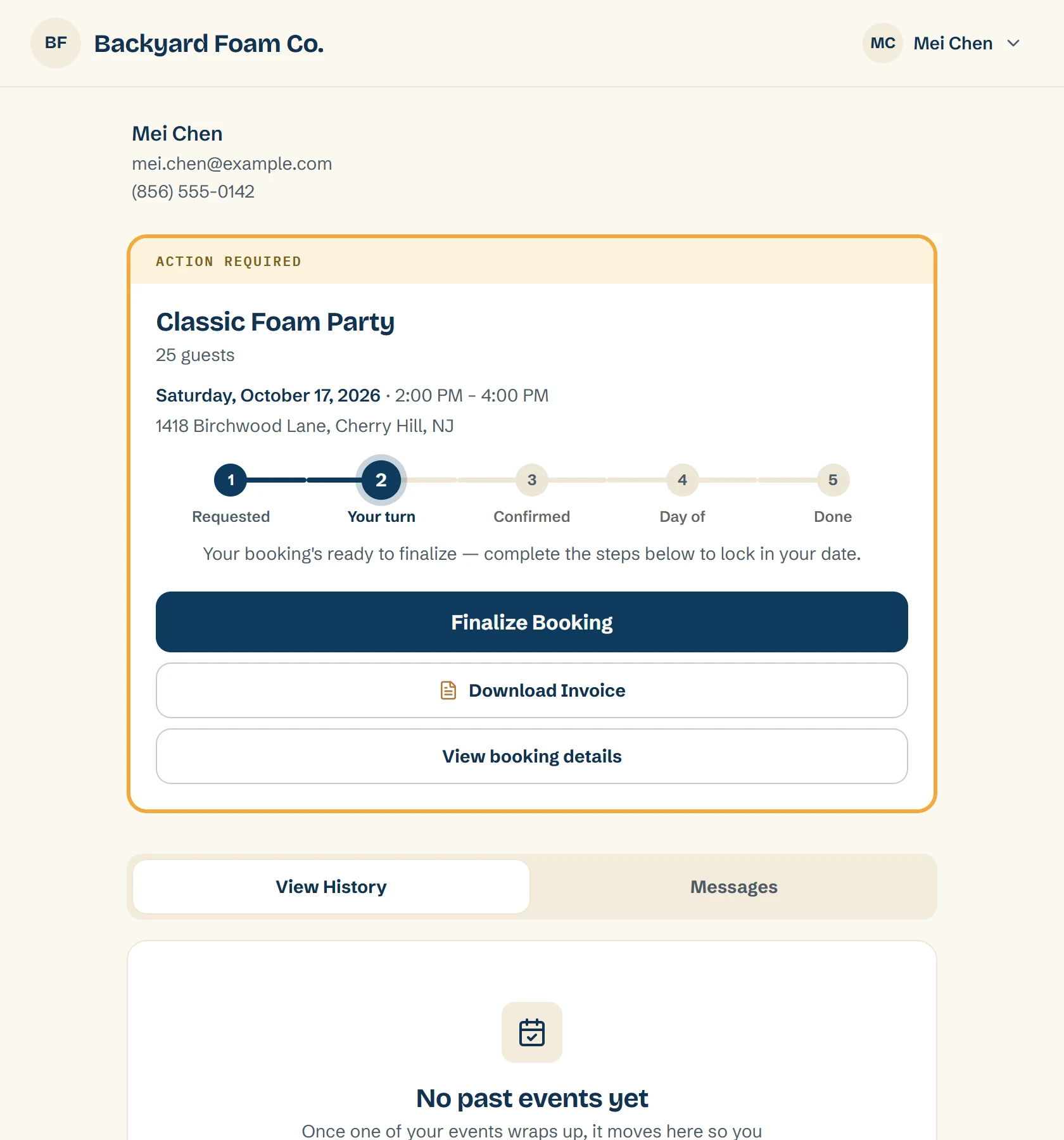
Anything needing attention is highlighted: sign here, deposit due
Deposit, balance, and payment history always visible
Booking details self-serve, so "what time are you coming" answers itself
Shareable with a coworker or spouse who's handling payment
Your W-9 and certificate of insurance, ready to download
Client portal: an Action Required card for the Classic Foam Party with the date, time and address, a five-step progress bar at Your turn, and buttons to finalize the booking, download the invoice and view the details
Questions operators ask
Does Rally confirm bookings on its own?

No. Rally can accept a normal request on its own, and your deposit rules still decide when that booking is confirmed. You control those rules, including whether an unpaid deposit blocks confirmation.

Can I still review every request myself?

Yes. Auto-accept is one setting, and it only covers requests from your booking page. Leave it off and you look at every request before it goes anywhere. To approve one, you open Prepare Booking and press Approve and Send.

What does the client get when a request is auto-accepted?

The same things they get when you approve it yourself: the agreement, the deposit request, and the Booking Approved email. They go out on their own.

What makes a request wait for me?

A request stays Requested when it overlaps another booking, when the guest count is above or below the package's limits, when Rally couldn't work out a price, when the package is priced by custom quote, when the client type hides prices, or when an add-on is no longer offered. When you open the booking, it says why.

How is the travel fee worked out?

You set a base, a free radius, a per-mile rate and a cap for each brand. Rally uses Google driving miles there and back to work out the fee. The client sees it as its own line in the price on the booking form. If no distance comes back, it leaves the fee for you to fill in.

Whose number do the texts come from?

Yours. Rally texts the client from your own connected Quo number. If you haven't connected one, you send the link from your own phone. If a client replies STOP, Rally stops texting them.

Can schools and corporate clients ask for a quote instead of seeing prices?

Yes, once you set it up. A client type such as school or corporate hides the prices, shows your own message and sets a setup lead time. The request arrives flagged “Needs your quote”, and you write the quote.

Does it work on the website I already have?

Yes. The booking form is embedded on your own website. If you run more than one brand, each brand gets its own booking page on its own site.

Put the booking form on your own website

Start free, or book a walkthrough and Danny will map your setup into Rally while you watch.

Your first 10 bookings are free, whenever they happen. No card to start.